Table of Contents
VpnStuff.net — If talking about VPNs is endless, there are lots of tricks and tips that you can do with a VPN. As will be discussed in this post, namely: How to Use V2Ray CDN Websocket on Android.
V2Ray is a VPN that uses the VMESS protocol which has the advantage of high speed and UDP support.
If you use a VPN for more purposes, for example for certain tricks, you can try this V2Ray CDN WS trick.
How to Use V2Ray CDN Websocket on Android
In the V2ray application there is an SNI form. This form is usually used for an internet trick. For example, you will change a certain package to become the main quota. For example, you have an Instagram package and then you want to access all sites using that Instagram package. This method is usually called an internet trick.
So you can try this method using V2ray.
Before applying this tutorial if you don’t know how to use v2ray, you can take a look at our previous post.
In the V2ray application click the pencil mark. Then in the Address form normally is the host of the v2ray server you are using. Now you can replace it with the SNI you are using. For example, the Instagram package as we described above.
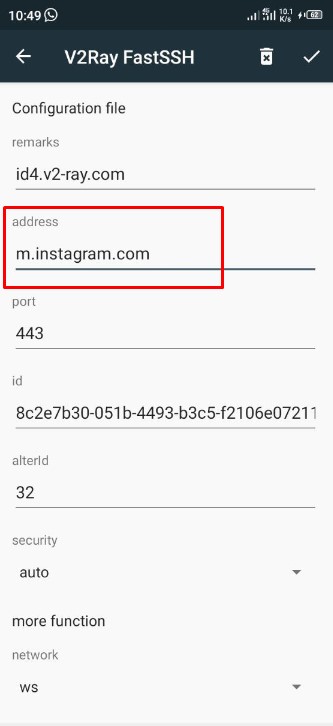
Scroll to the bottom of the v2ray application, on the SNI form which normally is SNI, you replace it with the v2ray host server you are using.
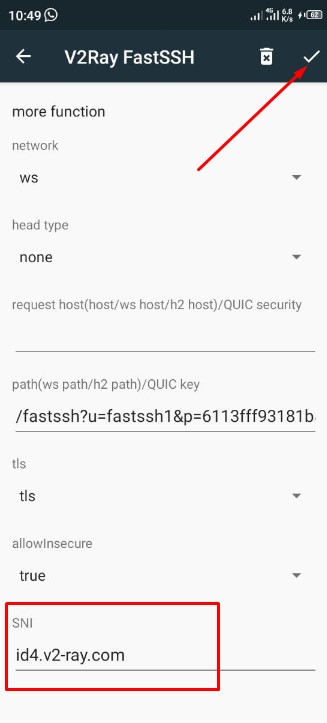
Don’t forget to save.
The conclusion is, this trick reverses the v2ray host to SNI and vice versa.